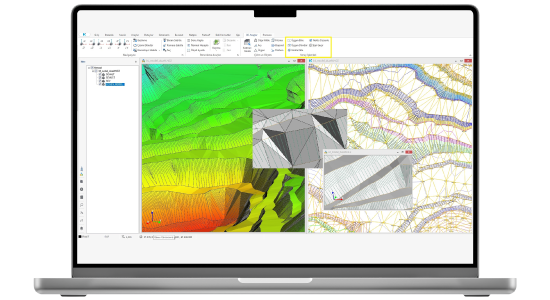
Netsurf is an easy-to-use and flexible terrain modeling solution developed for producing, editing, and analyzing numerical models. It allows you to create highly detailed numerical models from all kinds of data and perform various analyses on these models. You can simultaneously view and edit models that are imported from different formats or created by yourself in a 3D environment. Netsurf enables you to easily create all stages of existing maps that show the current state of the terrain. You can perform cross-section and profile operations precisely; you can obtain your volume calculations from cross-sections, by prismatic methods, or from point cloud data. As part of the Netcad ecosystem, Netsurf ensures that terrain is accurately modeled and analyzed in engineering, planning, and construction projects. Thanks to its powerful calculation capabilities and user-friendly interface, it helps you effectively evaluate terrain data and achieve highly accurate results in your projects.
Thank you, we have received your form. We will get back to you as soon as possible.
There are incorrect fields, please check and resubmit.
Quickly create your terrain model using millions of objects from different data types in full detail. Create your digital models from data generated by all types of platforms and file types, including terrain measurements, Point Cloud, *.Shp, *.e00, *.Dxf, ASCII, GPS, Raster, and LandXML. You can use potential slope, streamline, building data and details on the model during the model creation process.
Update Models Automatically
With the tools we provide, you can add different geometries to your model, such as points, details, and buildings. You can combine different models. You can monitor every operation simultaneously on the 3D screen.
Automated Model Analysis and Control
Identify potential errors in your project's models using triangular models that meet defined criteria. This process can also be applied in 3D.
Perform Surface Analyses
Perform slope, aspect, elevation, and density analyses. You can generate Thiessen polygons.
* Analyst license required.
Perform Cross-Section, Profile, and Volume Calculations
Generate cross-sections and profiles. Perform your volume calculations using various methods, from cross-sections, prismatic or point cloud data.
VIDEOS
Netsurf Videos
Check out the informative promotional videos about the product's features.
Model Verification Process | Netsurf 9.0.0
Automatically update and analyze your models
Automatically combine your models
Get model grade differences
F.A.Q.
Frequently Asked Questions about Netsurf
Can Netsurf work with data in different formats?
Netsurf can easily create digital terrain models using data in formats such as *.shp, *.e00, rasters containing elevation information, and similar formats. It works in an integrated manner regardless of the data source.
Can LandXML data be transferred to Netsurf?
Data in LandXML format can be automatically transferred to Netsurf with a single click. In this way, the user can quickly convert external data sources into the model.
What edits can be made to models created with Netsurf?
Netsurf can perform triangle flipping, point densification, slope creation, and scanning operations in compliance with regulations. In this way, it represents the topography of the terrain accurately and in an optimized manner.
Which methods are used for volume calculations in Netsurf?
Cut and fill volumes between two surfaces are calculated automatically. The user can select section-based or prismatic methods to obtain reports and 3D visual outputs. In addition to these calculations, volume calculations can also be made according to a specified base elevation.
Can contour lines be generated with Netsurf?
Netsurf automatically generates contour lines at desired intervals based on the digital terrain model. The user can print the elevation values of the contours according to intervals or specified lines.
What analyses can be performed with contour operations?
The total area of a contour passing through a certain elevation can be calculated; in this way, surface measurements such as pond or dam areas can be determined. In addition, contours passing through slope, building, and road details can be deleted automatically.
Comments from Netsurf Users
“In Dubai, the Hatta Pump Storage Hydroelectric Power Plant project, which we initiated as the Strabag-Özkar JV, is being showcased and monitored as a pilot project in the Gulf and Arab countries. With the renewed project, we are actively using Netcad software in every phase of the project: Netsurf 8, Netpro 9, and Excanet3 modules... Netcad, with Netpro9, has also solved the dynamism in the design phase."
Murat Pehlivan
Strabag Dubai LLC
"I am a user of the updated Netpro 9, Netsurf 8, 3D, and Exanet 3 modules. In road and infrastructure projects, it's my indispensable program for construction, progress payments, and final accounting, thanks to its practicality, speed, reliability, and language support."
Ali Yıldızbaş
Kocaeli Metropolitan Municipality
"We have had a good experience working with Netcad for many years. We use Netsurf, Netpro, Excanet, and 3D for preparing road routes, preparing terrain data with the application, and performing payment calculations. The new versions released in 2020 have some notable innovations that make our work easier."
Oktay Işık
İÇTAŞ
Contact
Easily contact our sales representatives or technical support team





.svg)


