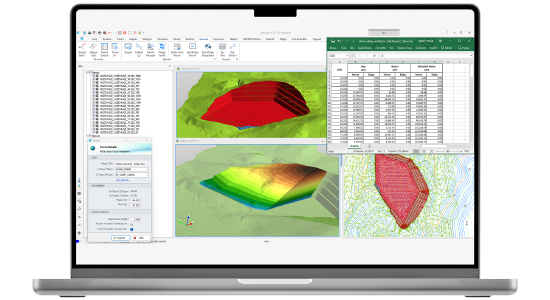
Excanet is a Netcad solution that enables the professional execution of excavation and fill designs for construction works of any scale such as buildings, residential sites, parking lots, airports, ports, landscaping areas, bathymetric projects, tunnel portal entrances, highway facilities, water reservoirs, or ponds. By considering all design criteria required in excavation and fill operations, it allows you to create your projects with precision. While working on the plan with Excanet, excavation and fill areas are automatically generated in three dimensions; cross-section drawings and volume calculations are performed instantly.
Prepared excavation plans, project outputs, and reports are produced in compliance with standards. Especially in projects such as residential site construction that involve multiple excavation/fill areas, it saves significant time with its batch reporting and cross-section generation features.
Excanet provides a powerful infrastructure that accelerates the design process, minimizes errors, and delivers results fully compliant with engineering standards.
Thank you, we have received your form. We will get back to you as soon as possible.
There are incorrect fields, please check and resubmit.
Reach the result in just 3 steps. Determine excavation levels, define slopes and get automatically created surfaces. Automatically generate your interrelated surfaces belonging to your complex facilities.
Auto Revise
Excavation plan, surfaces, volume calculations, reports and cross-section drawings are automatically revised in case of changes in excavation levels, slopes or geometry.
2D and 3D Automatic Project Controls
Take control of your excavation plans. You can keep track of information such as excavation levels, slope inclines, naming of each excavation area through the interactive editors. You can use 3D support in every stage of the project.
Sophisticated Ready-to-Use Templates
Take advantage of ready-to-use slope and platform templates we have provided for you. Develop your own library.
Soil Volume Comparison
Automatically extract soil comparison calculations between implemented and designed projects.
VIDEOS
Excanet Videos
Informative videos about the features of the product
Generating Steep Slope Surfaces | Excanet 5.0.0
Excavation Classification Method | Excanet 5.0.0
Modeling and Volume Reports Between Levels | Excanet 5.0.0
Surface Modeling in Transitions Between Different Segment Definitions | Excanet 5.0.0
Automatic Project Revisions
Project Controls
New Capabilities in Level Editor
Cross Section Drawings
F.A.Q.
Frequently Asked Questions about Excanet
Can cross-section outputs be automatically obtained in Excanet?
In Excanet, cross-section outputs can be automatically designed with all parameters. They can be easily created and saved through the selected template file, including title block, signature sheet, area, and volume information.
How are user-defined slope settings made in Excanet?
In Excanet, slope scans can be created by selecting the desired codes within the project. The user can easily determine which codes the slopes will be applied to through the Slope Scan Settings and keep the process fully under control.
Are excavation and fill plans automatically generated in Excanet?
Excanet automatically generates excavation and fill plans based on the codes used in slope definition. Sloped and elevation-based plan drawings are created quickly and in compliance with standards, including all details.
Can the created excavation and fill surfaces be viewed in 3D?
All excavation and fill surfaces created in Excanet can be viewed in three dimensions. Thanks to 3D support, projects can be realistically examined and analyzed at every stage.
Is it possible to calculate volume with an intermediate surface?
In Excanet, volume calculations can be performed between three surfaces. By comparing project, application, and intermediate (e.g., survey) surfaces, excess excavation and fill amounts can be determined, and non-progress areas can be reported.
What types of excavation and fill projects can be done with Excanet?
Excanet can easily perform excavation and fill design for projects of any scale, from single buildings to multi-structure residential sites, from bridge and pole foundations to airports and parking lots. Even complex, multi-level surfaces are automatically resolved.
Excanet User Reviews
“We use Netcad in our projects. The new version of Netpro 9 has brought many necessary innovations. In particular, the feature that allows the project to be revised when parameters such as horizontal and vertical changes means that our processes are completed in a very short time."
Mehmet Türk
KGM
“In Dubai, the Hatta Pump Storage Hydroelectric Power Plant project, which we initiated as Strabag-Özkar JV, is being showcased and monitored as a pilot project in the Gulf and Arab countries. With the renewed project, we are actively using Netcad software in every phase of the project, specifically Netsurf 8, Netpro 9, and Excanet3 modules. Netcad, with Netpro9, has also solved the dynamism in the design phase.”
Murat Pehlivan
Strabag Dubai LLC
"Netcad, one of Turkey's leading software companies, has once again proven its leadership in the mapping and construction sectors by successfully completing the entire Ankara-Niğde Highway project from start to finish. It assists us in producing practical and reliable solutions at every stage of the projects, from preparation and precise quantity surveying to application."
Onur Kahraman
ERG Construction
"I am a user of the updated Netpro 9, Netsurf 8, 3D, and Exanet 3 modules. In road and infrastructure projects, it's my indispensable program for construction, progress payments, and final accounting, thanks to its practicality, speed, reliability, and language support."
Ali Yıldızbaş
Kocaeli Metropolitan Municipality
"We have had a good experience working with Netcad for many years. We use Netsurf, Netpro, Excanet, and 3D for preparing road routes, preparing terrain data with the application, and performing payment calculations. The new versions released in 2020 have some notable innovations that make our work easier."
Oktay Işık
İÇTAŞ
"Netpro 9 has come a long way toward becoming a completely different version. It's commendable to see the program's dynamic structure, allowing users to reflect project changes in drawings and reports with a single command, which is highly beneficial for users. The small touches in Netpro 9 have made things effortless, while the big touches have brought professionalism."
Ali Fuat Şan
EkPet Construction
Contact
Easily contact our sales representatives or technical support team